

Cover Photo by Edu Lauton on Unsplash
I have an Instagram account. In fact, I manage a few accounts. Between the brands that I professionally work for, my personal account, and my passion project @MyWinePlaylist, I thought that I kind of had it figured out. Then I took LinkedIn Learning’s “Marketing on Instagram” course with Anson Alexander. Now I am excited to share his insights right here on my latest “How To” blog.
The online course starts with the basics, like the very basics, of how to set up your Instagram profile. Alexander reviews the icons on Instagram and highlights some of the important tools.
Even if you know it all, it was a good check box to be sure that you have set up your Instagram profile for success.
A profile photo is the most important part of your profile. Make sure you have one. It can be a photo or an image of your logo, but make sure it fits in a circle. And do not leave the profile photo blank. Your bio should be short and should include a link to your website if you have one.
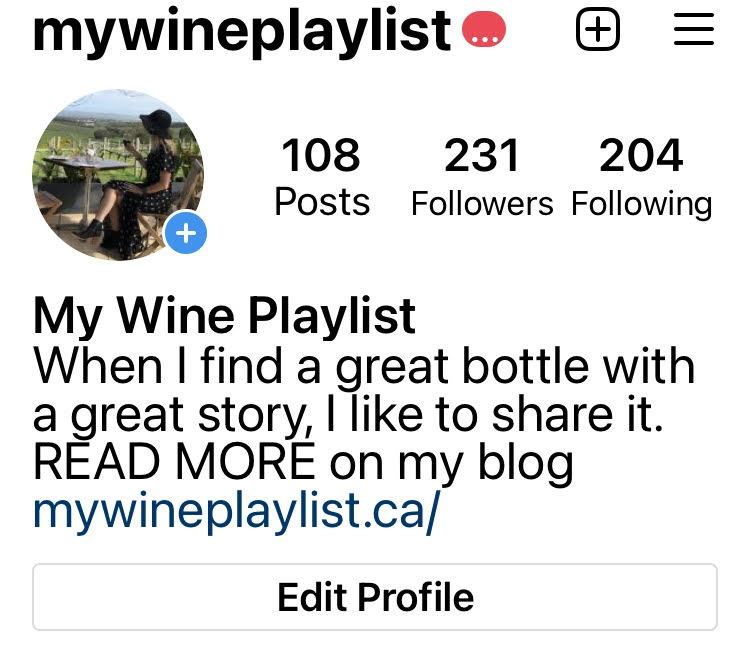
SWITCHING TO A PROFESSIONAL PROFILE
For me, it was a great time to take this course. I have been thinking about whether @mywineplaylist should become a professional account or leave it as a personal account. I am having so much fun with it but I would love to grow my followers and be more engaged on the platform.
Alexander recommends switching to a professional profile if you want to build and manage followers (Alexander, 2020). The professional account gives you access to insights. You also get business features like contact tabs and sponsored ads.
Converting to a professional account is easy but first, you must have a professional Facebook page. Go to your settings, select account, and switch to a professional account. Instagram will give you a series of questions to identify your professional category and contact info. It then connects to your Facebook page, and you’re set.
Once your professional account is set up, you should consider your business settings. You can set your privacy to determine whether to allow or to manually approve posts that you are tagged in. On your branded posts you can adjust the settings to allow for comments from everyone or to turn off comments on selected posts. You can also manage linked accounts to share your posts on Facebook and Twitter. Note that when you share an Instagram post to Twitter that it shares a link to Instagram versus the post itself. Facebook is the perfect platform for cross-promotion.
Social media is your chance to give your organization a personality.
Anson Alexander
How to use Instagram to build your brand
- Post photos…and videos! Instagram offers the perfect visual platform to increase awareness of your products and services.
- Show users what your business does best. Show them how to use your products in unique ways.
- Take people behind the scenes or show them what you do outside of your work and how you benefit the community.
- Look for viral marketing opportunities. You know, those fun photos and videos that people like and want to share.
- Host contests and giveaways. Tell people to post photos interacting with your product or service using a hashtag for a chance to win! Allow your customers to do marketing for you. User-generated content is one of the most powerful marketing tools.
- Use #hashtags to extend your marketing reach.

Get Inspired. Use your creative freedom.
- Use Images and Video to attract your audience
- Add Text to engage and to give people insight and helpful tips
- Think about the creative ways your product can be used. How can people benefit from your products?
- Capture the moments when people are benefitting the most from your product or service
- Use Instagram’s search tool to see what others in your industry or category are doing. What kind of content are they posting? Are they getting likes and comments?
- Or look at cool Instagram accounts for inspiration. Have you seen @Chobani on Instagram? Alexander mentions it is one of his favourites for inspiration. And it really is fantastic. While they are a yogurt, they show more than images of yogurt. Their strategy is to show how you can use their product. And it’s working. They have a very colourful profile and a happy vibe. Food (and pets!) are big trends on Instagram.
- Be unique, creative, and personal. Consider aesthetics from colour scheme to photo style and layout.
- Use a custom hashtag – use it for every post you publish on Instagram. Tell your followers, hey if you are using our product, share your photos and use our hashtag
HOW TO POST TO YOUR INSTAGRAM FEED
Instagram makes it very easy to upload your photos and videos on the platform.
- Simply tap on the plus (+) icon
- Choose a photo or video from your library or take a new one
- Square photos look best for the aesthetic of your profile but Instagram allows for landscape-oriented photos as well. You can adjust the size when you post the image.
- Post one photo or multiple photos to make a carousel. Or tap on the Instagram Layout icon to use several photos as one image.
- You don’t need to be a professional photographer. Instagram gives you lots of filters and edit tools to make your photos look their best.
- Alexander’s Pro-Tip: If you have filters that you use all the time, make them your favourites by tapping and holding the filter then move it to the front of your options.
- Next, add a caption with text and hashtags.
Let’s talk about #hashtags.
“Hashtags are your avenue to get more followers on Instagram (Alexander, 2020).”
Hashtags can be included in the main text or posted at the bottom of your post. Many people choose to keep their posts clean and put hashtags in the comments. Instagram allows for up to 30 hashtags in your caption or in the comments. It is important to know that captions can be edited, comments cannot.
Also, consider adding a Location to your posts.
If you tag a location then your photo will show up when people have an interest to search by location. Alexander shares that some brands have seen a 50% increase in the number of views just from adding “Location” to their posts (Alexander, 2020).
People follow both hashtags and locations.
The more hashtags you add the higher your potential reach. Be strategic. Use popular hashtags. Instagram helps with this and Google can too. Simply search for “popular hashtags” in your industry and use them!
Find what others in your industry are using. And follow hashtags! This is highly recommended and a tactic used by social media influencers.
The bottom line is: DO NOT NEGLECT HASHTAGS. Make use of them as much as possible and be familiar with which ones are most popular in your industry and interests.
HOW TO DO INSTAGRAM STORIES
Stories are different from regular posts. They don’t show up on the feed and they are only available for 24 hours.
Alexander says Stories are a great way to show the personality of your brand on Instagram (Alexander, 2020).
Where to find Stories? They are located at the top of the screen with colored circles around user profiles. Simply tap to view.
To create a Story:
- Tap the plus (+) icon or swipe left to right and select Story.
- Now you can add photos and videos from your gallery, or you can take a new photo or video at the moment. Use the portrait orientation for stories.
- Add filters, text, music, stickers, @mentions, and don’t forget your location, where appropriate.
- If you add something you don’t want, just move it to the trash can.
- Be creative with Stickers. This is by far one of the best features for Stories.
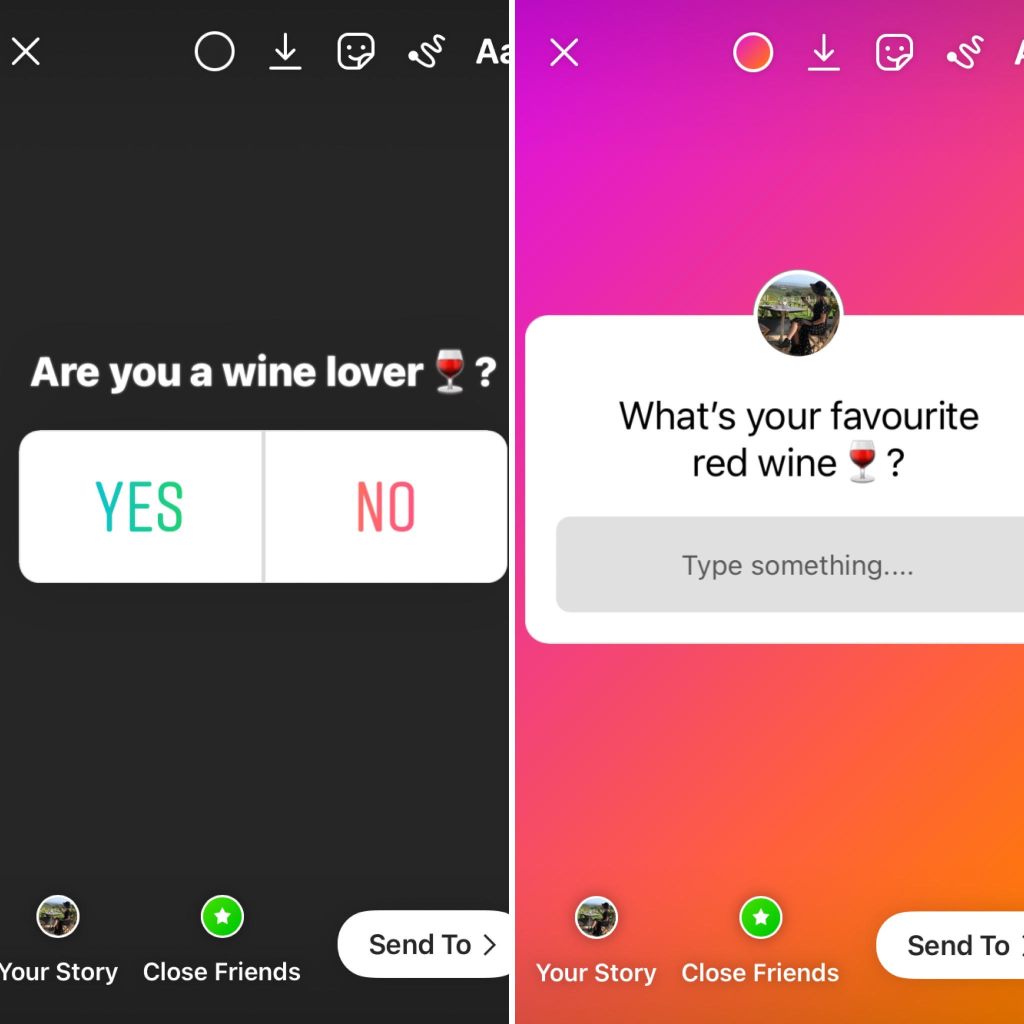
Sticker Polls and Questions are an effective way to get feedback from customers and insight into followers’ preferences.
- Select the Stickers button
- Choose Poll or Questions
- Follow the prompt to create a question and add the text
- For the Poll, you can also change the YES and NO to other text if required
- Then tap “Done” and position it anywhere on your story
- Tap and swipe up to see insights and the results of your poll including all of the responses.
What type of content is good for Instagram Stories?
Anything! Be fearless, but appropriate.
- Behind the scenes content is so good. It gives your brand a human touch.
- It’s also a great place for releases and announcements. It makes your followers feel they are getting something more exclusive.
- Repurpose posts from your feed. Click on the arrow icon to post a feed to your Story. Add some creative flair and then re-share.
- Give shout-outs to individuals and organizations that you work with.
- And share inspirational messages. It’s a nice way to share something positive that you otherwise may not post more permanently on your feed.
- While Instagram Stories disappear in 24 hours, they always live in your archives. You can extend the life of your Stories by putting them in “Highlights” which are like albums on your Instagram page. You can categorize these highlights – ie Product Reviews, Behind the Scenes, Special Events, etc.
Alexander’s Pro tip: If you have multiple story highlights but you want to position one of them more prominently, tap on the highlight, click to remove it, and then re-add it. It will then position at the beginning of your highlights (Alexander, 2020).
Oh yeah, and when you hit 10K+ followers, Instagram gives you special privileges like the “add link” options to your Stories. #swipeup #goals
Remember to be creative and fearless. Stories last only 24 hours and you can always delete them. Alexander suggests looking at Stories as a live testing ground for creative that could work on your Instagram feed or other platforms (Alexander, 2020).
HOW TO DO INSTAGRAM REELS
Make Reels part of your marketing strategy. Similar to TikTok, Reels allows you to upload creative video content to your users. Create videos, edit, and add audio effects.
Get inspired by searching Instagram’s Explore page and then… create:
- From the home page, swipe left to right and select Reels on your screen.
- Before you upload your video or take a new video, use the edit tool icons on the screen to configure your reel.
- Select music if desired.
- Set your Timing. You can record in any speed – slow motion to high speed.
- Use the Effects icon to overlay effects on what your camera is looking at
- Set the Clock timer for the length of your video, up to :15 seconds.
- Then record a video live or upload one from your library.
You can add multiple video clips to a reel and here’s how:
- Tap on the first clip you want to use. Trim by dragging to the desired start and endpoint, then tap the check mark.
- You can tap on the arrow on right to give you a preview
- Use the back arrow to go back and add more from your library
- Configure your effects first and then tap on the bottom to select another video
- Again trim the clip, tap on the check mark, and tap the right arrow to see a full preview.
Now you will see the 4 Instagram icons on the top to add stickers, filters, draw or add text. Click “next” to be prompted to share the reel to Explore or if you want it to show up on your feed. I believe it should always show up on your feed, and shared to your Story. Add a caption to get people to watch and understand why you are posting, then share.
Notice that there is a “Reels” section on your Instagram profile. Any Reels you create will automatically populate there.
HOW OFTEN SHOULD YOU POST ON INSTAGRAM?
Alexander recommends that you get into a regular posting schedule to increase user engagement. Pick a day or two days of a week and schedule your posts for those days. Get people used to watching for your content on specific days. It’s a great way to have people go to your profile page looking for your content. And it makes it easier to plan your content (Alexander, 2020).
Participate in themed days or what I call Hallmark occasions throughout the year like Mother’s Day, Father’s Day, Thanksgiving, Halloween, Christmas, Easter… you get it.
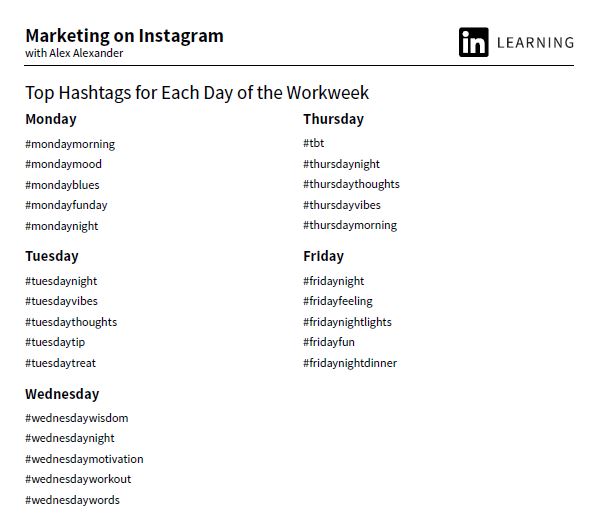
Did you know there are hashtags for each day of the week? Add these popular hashtags to your posts and you will show up in more feeds (Alexander, 2020).
You can use third-party apps to help schedule your content like HootSuite and Sprout Social, who are industry leaders for content scheduling. SkedSocial.com was the first auto-posting app for Instagram and allows you to schedule Stories in addition to your posts.
ADVERTISING ON INSTAGRAM
Your professional account gives you access to the Sponsored Posts tool. Promote your posts, choose who you want to target, your duration, and your budget. Sponsored ads look similar to posts but say Sponsored at the top. Promoted posts are shown in targeted users’ feeds and are a low-cost way to expand your reach. It is the same process at Facebook Advertising and you can run the same campaign on both platforms. Note that you can advertise Photo Ads, Video Ads, Carousel Ads (multiple images), and Stories. If you choose to advertise on Stories remember your creative is only available for 24 hours and to use the portrait orientation. Another option is to post Ads in Explore. This is an area that people are discovering new people and interests to follow. They are looking for something new and then you show up.
INSIGHTS ARE INVALUABLE
Your professional account gives you access to Instagram’s Insights featuring three sections – content, activity, and audience.
Under Content, you can see how many post and stories you have posted that week and how many people have seen and engaged (likes and comments). This is a helpful tool to gauge which posts are more successful and then to continue doing more of the same.
Activity measures the reach (the # of accounts that saw your posts), impressions (the # of times your content was viewed), and interactions (likes and comments) compared to the previous week. These insights are a great way to gauge which days are better than others. You can also see how many people viewed your profile.
The Audience section is the best because it is all about your followers. You can see growth and how many you have lost. Alexander says not to stress out about this too much as the loss is usually Bots who have unfollowed you. So I suppose that is actually a good thing! You can also see demographic info including age range and gender. The audience also shows when, by day and hour, your followers are most likely to be on Instagram. This is valuable information that can improve your content and the timing of your posts.
HOW TO CREATE AN “ADD TO CART” KIND OF DAY FOR YOUR FOLLOWERS
Did you know that retailers can now Open A Shop on Instagram? If you have a tangible product, you can sell it right within the app. You’ve probably seen the posts on your feed. They have a shopping bag icon on the image. I have provided an example below from two of my favourite online stores here.
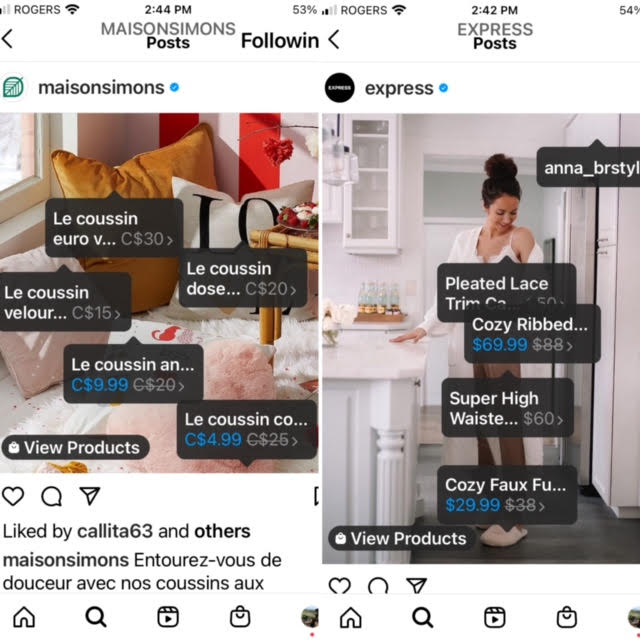
This tool literally puts shopping at your fingertips. You can view product labels of every item pictured in the image giving you the product name and price and with one more tap that item can go right in your shopping cart.
The feature at this time is limited to major retailers who are already set up with Facebook Catalogue. But I am sure it is just a matter of time before some of my favourite boutique stores are using the platform!
HOW TO EMBED INSTAGRAM LINKS ON YOUR WEBSITE
This Pro-Tip from Alexander has been a game-changer for me! I was so excited that I added a post to My Wine Playlist blog immediately following the lesson! And it worked… here it is!

Embedded Instagram links are a fantastic way to repurpose content. You can do this right from your desktop. Find your post, grab the URL, copy and paste it right into your web post! You can also do this with YouTube links. It’s a great way to get users on your website to follow you on Instagram (Alexander, 2020).
“Don’t make Instagram a place where you dump your photos and leave them. Dive in and be a member of the community (Alexander, 2020).”
Interact with your followers and your industry. Look at your competitors – follow them! Then engage. Like their photos or comment to notify the user. You can be more personal by leaving a comment and you should @mention people. Commenting allows people to notice you and hopefully click on your profile as a new follower (Alexander, 2020).
Thoughts on Bots
Alexander concludes with his insight on bots.
Bots are spam accounts that automatically interact with your account – following, liking, or commenting. If you get followed, don’t worry they will eventually unfollow you.
Instagram bots are services that allow a company to get followers onto their Profile. If you are a business, do not use this service. Bots violate Instagram’s Terms of Use and accounts are getting banned. When you see accounts unfollow don’t get too discouraged, they are likely bot accounts (Alexander, 2020).
MY CONCLUSION
As I mentioned earlier, LinkedIn Learning’s “Marketing on Instagram” course with Anson Alexander was timely for me. I am now switching @mywineplaylist to a professional account and hope to see benefits in the number of followers.
A real highlight for me was learning about embedded Instagram posts to extend that content to my blog. And the best practices for Posts, Stories, and Reels shared by Alexander will help to make my content more engaging and timely.
For more information on how to set up your professional business account on Instagram go to https://business.instagram.com/
If you are a #winelover, please follow me on Instagram @mywineplaylist
References
Alexander, A. (2020, September 24). LinkedIn Learning: Marketing on Instagram. Retrieved from LinkedIn.com: https://www.linkedin.com/learning/marketing-on-instagram-2
Author: Rhonda Halarewich
Keywords: Instagram, Instagram Marketing, How To, LinkedIn Learning, Help Me Rhonda, Instagram Story, Instagram Reels, Instagram Posts, Hashtags, Sticker Poll
Readability: Grade 5
 Help Me Rhonda